
吾心皎然,如秋阳之明; 吾气肃然,如秋阳之清; 吾好善而欲成之,如秋阳之坚百谷; 吾恶恶而欲刑之,如秋阳之陨群木。 方是时也,如醉而醒,如瘖而鸣,如痿而起行,如还故乡初见父兄。
起因
某台 CentOS 6 的服务器,搬运之后,ip 发生了变化,于是重新配置静态 ip 。按照搜出来的教程,折腾了好久,发现 DHCP 就能上网,只要配置了静态 ip ,就只能够连接局域网,无法访问互联网。
搜索教程,找到网络配置的地方:
cd /etc/sysconfig/network-scripts/编辑 ifcfg-* ,配置 IPADDR GATEWAY DNS1 等
然后重启网络的服务:
service network restart包括使用 nmcli 以及图形工具 nmtui ,都是不行。
尝试修改 DNS ,重启 NetworkManager
systemctl restart NetworkManager会自动生成 /etc/resolv.conf ,还是不行。
# Generated by NetworkManager
nameserver 114.114.114.114
nameserver 114.114.115.115
升级
本来也嫌弃这系统太老,Visual Studio Code Server 都 跑不起来 ,于是打算升级一下。
升级过程中,尽管解决了一堆报错,也找到了 Rocky Linux 的 迁移脚本。
最后灵机一动一重启,grub 没找到 linux 内核,重启只能进到急救模式。
重装
下载一个 Live CD ,进到图形界面,安装 GParted ,看到系统是 lvm2 格式分区,另一个盘是 xfs 的格式,无法调整分区省出空间来安装新系统。
XFS 是基于 RHEL (如 Oracle Linux、Rocky Linux 和 AlmaLinux)的发行版中的默认文件系统,Ext4 是 Debian 和 Ubuntu 发行版中的标准文件系统。
LVM 格式 大概是将多块物理磁盘,合并到一个虚拟的磁盘,然后在其上配置分区。
安装了 KDE 分区管理器 能看到 LVM 分区的详情,但是还是无法调整。
只能将个别文件备份之后,下载 Rocky Linux 刻盘安装。
先把原来的盘都删掉,然后自动分区,安装很丝滑,几乎都是自己处理好。
配置
进到系统后,发现下载的虽然是默认镜像,但是自带了 Gnome 桌面。这时候进到桌面环境配置静态 ip ,发现换到别的 ip 地址还是无法联网,只能将当前的 ip 地址设置为静态 ip,发现可以上网了。可能是外部网络配置的原因吧。
安装 docker ,docker ce 的 repo 现在不能直接连接了,配置了镜像,选择发行版改成 centos 基本就完成了。
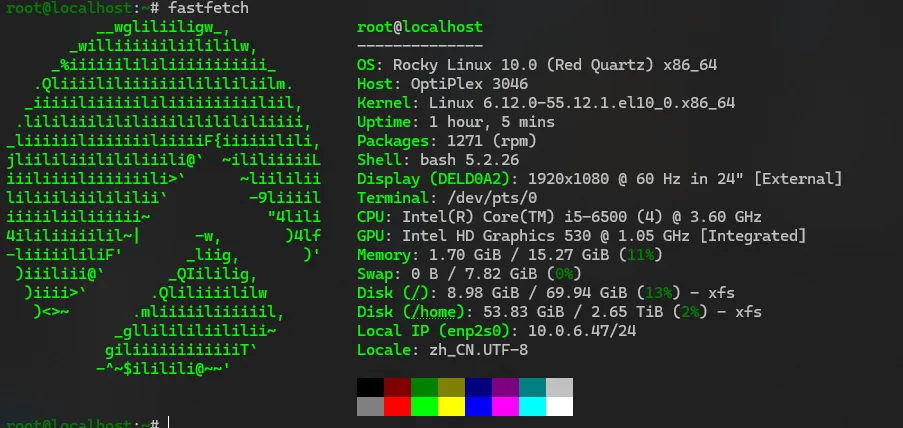
后面登录终端还发现,Rocky Linux 居然还自带一个 web 控制台 ,使用的是 Cockpit。可以管理文件,网络更新软件等等。
其他
尝试安装 gparted 和 partitionmanager ,发现直接安装都找不到。搜了一下, epel 9 里边有 gparted,10 里边没有。
于是想到可不可以在 Rocky Linux 10 里边安装 epel 9 ,尝试直接安装
sudo dnf install https://dl.fedoraproject.org/pub/epel/epel-release-latest-9.noarch.rpm提示的是降级安装,那么要考虑怎么让两个 epel 共存。进到 /etc/yum.repos.d/ 新建一个 epel-9.repo ,然后内容找这个 镜像 来:
[epel-9]
name=Extra Packages for Enterprise Linux 9 - $basearch
# It is much more secure to use the metalink, but if you wish to use a local mirror
# place its address here.
baseurl=https://mirrors.tuna.tsinghua.edu.cn/epel/9/Everything/$basearch/
#metalink=https://mirrors.fedoraproject.org/metalink?repo=epel-9&arch=$basearch&infra=$infra&content=$contentdir
enabled=1
gpgcheck=1
countme=1
gpgkey=file:///etc/pki/rpm-gpg/RPM-GPG-KEY-EPEL-9

[epel-9-debuginfo]
name=Extra Packages for Enterprise Linux 9 - $basearch - Debug
# It is much more secure to use the metalink, but if you wish to use a local mirror
# place its address here.
baseurl=https://mirrors.tuna.tsinghua.edu.cn/epel/9/Everything/$basearch/debug/
#metalink=https://mirrors.fedoraproject.org/metalink?repo=epel-debug-9&arch=$basearch&infra=$infra&content=$contentdir
enabled=0
gpgkey=file:///etc/pki/rpm-gpg/RPM-GPG-KEY-EPEL-9
gpgcheck=1

[epel-9-source]
name=Extra Packages for Enterprise Linux 9 - $basearch - Source
# It is much more secure to use the metalink, but if you wish to use a local mirror
# place its address here.
baseurl=https://mirrors.tuna.tsinghua.edu.cn/epel/9/Everything/source/tree/
#metalink=https://mirrors.fedoraproject.org/metalink?repo=epel-source-9&arch=$basearch&infra=$infra&content=$contentdir
enabled=0
gpgkey=file:///etc/pki/rpm-gpg/RPM-GPG-KEY-EPEL-9
gpgcheck=1
还要下载一个 RPM-GPG-KEY-EPEL-9 ,放到 /etc/pki/rpm-gpg 目录:
wget https://dl.fedoraproject.org/pub/epel/RPM-GPG-KEY-EPEL-9这时候运行 dnf repolist:
root@localhost:~# dnf repolist
仓库 id                 仓库名称
appstream               Rocky Linux 10 - AppStream
baseos                  Rocky Linux 10 - BaseOS
crb                     Rocky Linux 10 - CRB
docker-ce-stable        Docker CE Stable - x86_64
epel                    Extra Packages for Enterprise Linux 10 - x86_64
epel-9                  Extra Packages for Enterprise Linux 9 - x86_64
extras                  Rocky Linux 10 - Extras
plus                    Rocky Linux 10 - Plus
更新一下再安装:
dnf update
dnf install gparted
然后报错:
root@localhost:~# dnf install gparted
上次元数据过期检查:0:31:59 前,执行于 2025年08月09日 星期六 16时01分38秒。
错误:
 问题: 冲突的请求
  - nothing provides libglibmm-2.4.so.1()(64bit) needed by gparted-1.4.0-1.el9.x86_64 from epel-9
  - nothing provides libsigc-2.0.so.0()(64bit) needed by gparted-1.4.0-1.el9.x86_64 from epel-9
  - nothing provides libgdkmm-3.0.so.1()(64bit) needed by gparted-1.4.0-1.el9.x86_64 from epel-9
  - nothing provides libgtkmm-3.0.so.1()(64bit) needed by gparted-1.4.0-1.el9.x86_64 from epel-9
  - nothing provides libatkmm-1.6.so.1()(64bit) needed by gparted-1.4.0-1.el9.x86_64 from epel-9
  - nothing provides libcairomm-1.0.so.1()(64bit) needed by gparted-1.4.0-1.el9.x86_64 from epel-9
  - nothing provides libpangomm-1.4.so.1()(64bit) needed by gparted-1.4.0-1.el9.x86_64 from epel-9
(尝试添加 '--skip-broken' 来跳过无法安装的软件包 或 '--nobest' 来不只使用软件包的最佳候选)
依赖冲突了。
虽然折腾了一下,还是没安装好。